For Enefit, your security is of utmost importance
In this article, we explain how to recognise scams and what to do if you receive a suspicious message.
Fraudsters are sending increasingly convincing emails and SMS messages to obtain your data or money. In most cases, they rely on you being in a hurry and not checking.
Remember 4 simple rules
- Always check the sender’s email address, not just the name (example: ENEFIT vs ENEFlT – in the second name, the letter l is used instead of I)
- Be cautious if you are being pressured to act quickly
- Do not click on links or open attachments if you were not expecting the message
- Do not share passwords, codes or banking details via email, SMS or phone
Enefit sends messages only from official addresses, for example:
- @enefit.ee
- @enefit.com
❌ Enefit does not use Gmail, Hotmail or similar addresses.
Which email addresses Enefit uses to send messages:
- [email protected] – Private customer invoices, private customer contracts, etc.
- [email protected] – Campaign emails, informational messages, etc.
- [email protected] – Offers, etc.
- [email protected] – Business customer invoices, business customer contracts, etc.
- [email protected] – Messages related to charging services.
- [email protected] – Customer surveys (transactions, relationships, products, etc.).
- [email protected] – Public charging notifications (charging start).
Scams are circulating in which Enefit’s branding is used to send fraudulent invoices.
Please be very careful when paying invoices: check the email address the invoice was sent from, and verify the company name and details. Enefit does not send invoices with QR codes.
Enefit AS issues invoices from the address [email protected], and you can always view your invoice in the self-service at www.enefit.ee.
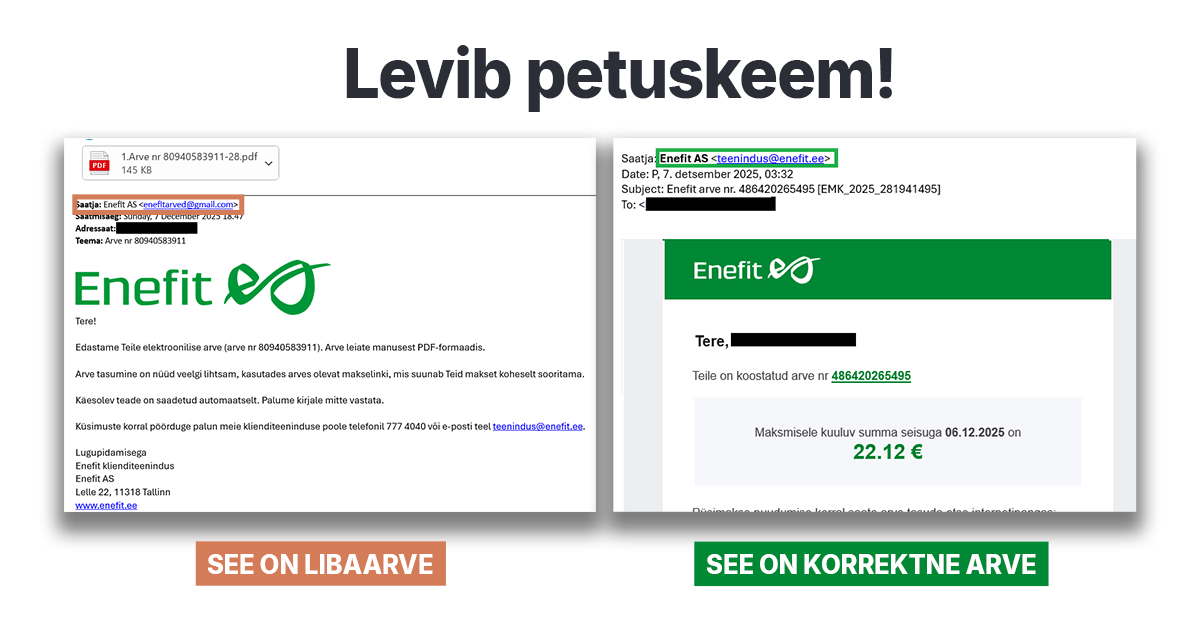
Remember: All major service providers have a homepage and a self-service. Log in to the provider’s self-service (by entering the provider’s homepage address into your browser yourself) and check there whether the invoice you received by email is actually there. When paying an invoice, it is always advisable to use the provider’s self-service.
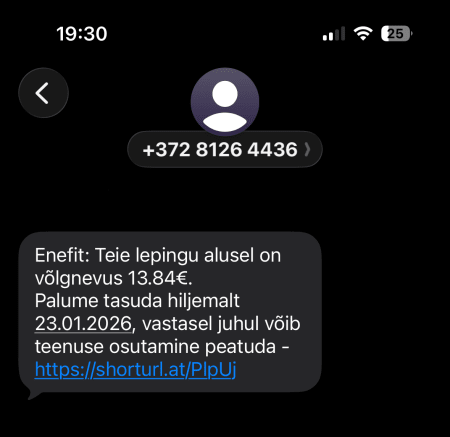
SMS messages and ‘debt notices’
Be especially cautious with messages that mention:
- an incoming parcel,
- an unpaid invoice or debt,
- an unexpected fine or ‘win’.
Always check the sender and do not open links.
Example of a scam message:
Why do fraudsters do this?
The aim of fraudsters is always personal gain:
- financial gain (bank details, invoices, ransomware),
- access to accounts or devices,
- collection and sale of personal data (name, personal identification code, phone number).
What to do if you suspect a scam?
❌ Do not click on links or open attachments
❌ Do not reply to a suspicious email or message
✅ Check the information via an official channel (eg the self-service)
✅ Delete the message or mark it as spam
If you have already entered your details
🔐 Change your passwords immediately
Also change them on other accounts where you used the same password.
🔐 Use multi-factor authentication
This provides additional protection even if your password has been compromised.
Golden rule
If your instinct tells you something is wrong, it probably is.
It is better to double-check than regret it later.
Be cautious across all channels: email, SMS, WhatsApp, Messenger, phone calls and even face-to-face conversations.